
















FAQs
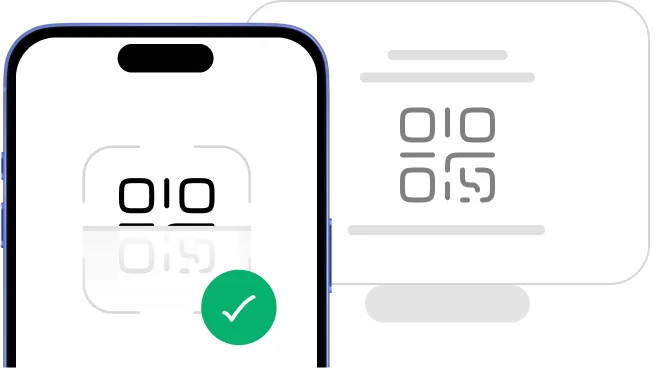
An eSIM is a digital SIM card built into your phone that lets you activate a cellular plan without inserting a physical card. You scan a QR code from your provider and the plan loads instantly. No hardware swap, no trip to a store.
An eSIM works by storing your carrier plan as a digital profile inside a chip already built into your phone. You download a plan from a provider and your phone connects to that network right away. You can add or switch plans without touching a physical SIM card.
You can store multiple eSIM profiles on one phone, but the number you can use at the same time depends on your device model. Most iPhones support two active lines at once. Check your phone's specifications to find the exact limit.
An eSIM is just as secure as a physical SIM card because both use the same carrier-level encryption to protect your connection. Hacking an eSIM requires the same level of access as cloning a physical card. HelloRoam does not store or share your call or data content.
eSIMs are good for international travel because you get data in a new country without swapping SIM cards or paying roaming fees to your home carrier. You buy and install a plan before you board. Switching between country plans takes seconds from your phone settings.
The main disadvantage of an eSIM is that older phones and some budget models do not support it. You also cannot physically move an eSIM to a new device the way you can with a plastic SIM card. Always check compatibility before you buy a plan.
Your phone supports eSIM if you see an 'Add eSIM' or 'Add Cellular Plan' option in your network or SIM settings. You can also check the manufacturer's website or run your model through HelloRoam's device checker. Most iPhones from XS onwards and recent flagship Android models support eSIM.
Travel eSIMs work with most iPhones from XS and later, Samsung Galaxy S20 and newer, and Google Pixel 3 and newer. Many OnePlus, Motorola, and other Android flagships also support eSIM. Use HelloRoam's device checker to confirm your specific model before buying.
You can use an eSIM on any iPhone from XS or later for international travel, giving you local data rates without swapping your physical SIM. Install your HelloRoam plan before departure and it activates automatically when you land. Your home number stays active on your physical SIM at the same time.
Many Android phones support eSIM, including Samsung Galaxy S20 and newer, Google Pixel 3 and newer, and select OnePlus and Motorola models. Not all Android phones include eSIM, so check your settings for an 'Add eSIM' option to confirm support before purchasing a plan.
Many cellular smartwatches use a built-in eSIM to stay connected without your phone nearby. Apple Watch Series 3 and later, Samsung Galaxy Watch 4 and newer, and Google Pixel Watch all support eSIM. Your smartwatch uses its own separate eSIM profile, not your travel data plan.
To install an eSIM, scan the QR code from your HelloRoam confirmation email in your phone's SIM settings. On iPhone, go to Settings, then Cellular, then Add eSIM. On Android, go to Settings, then Network, then SIM manager. The profile loads in 2 to 5 minutes.
You activate your HelloRoam travel eSIM by scanning the QR code in your confirmation email through your phone's cellular settings. Select 'Add eSIM,' point your camera at the code, and the profile installs in minutes. Data starts working when you arrive at your destination.
You can switch back to your physical SIM at any time by going into your phone's cellular settings and selecting it as the active line. Your eSIM profile stays saved unless you delete it. On most dual-SIM phones, both the physical SIM and eSIM can be active at the same time.
You do not need to turn off data roaming when using a HelloRoam travel eSIM because the plan is built for international use. Make sure your phone uses the eSIM as the active data line in your cellular settings. Turn off data roaming on your home SIM line to avoid unexpected charges from your home carrier.
eSIM activation fails most often because of a weak Wi-Fi connection or a QR code scanned more than once. Connect to a stable Wi-Fi network, restart your phone, and try scanning the QR code again. If the problem continues, contact HelloRoam support through WhatsApp or email with your order number.
If your eSIM stops working, restart your phone and confirm the eSIM profile is set as your active data line in cellular settings. Check for pending software updates, as outdated firmware can break eSIM connections. Contact HelloRoam support if the issue persists after restarting.
A HelloRoam travel eSIM costs less than international roaming in most cases, with fixed data plans starting from a few dollars for short trips. Unlimited plans are priced by the number of days you need. You pay once upfront with no hidden fees and no auto-renewals.
HelloRoam offers unlimited data travel eSIM plans that let you use as much data as you need without tracking a GB limit. You choose the number of days you want coverage and the plan runs for that full period. Unlimited plans are available for most countries HelloRoam supports.
The best travel eSIM plan matches your data habits and trip length. Light users who browse and map routes do well with a fixed GB plan. Heavy users who stream video or work remotely get better value from an unlimited plan. Enter your destination on HelloRoam to compare options.
A travel eSIM does not change your phone number. It adds a data-only connection, so your existing number stays active for calls and texts on your physical SIM. Your contacts can still reach you the same way while you use the eSIM for internet access abroad.
HelloRoam travel eSIMs are prepaid, so you pay upfront with no contract, no monthly bill, and no auto-renewal. You pick a plan, complete checkout, and receive a QR code by email. There are no hidden fees and your payment covers exactly what you selected.
A HelloRoam global eSIM covers 175 or more countries, so you can stay connected across most of the world on one plan. Regional plans cover specific areas like Europe or Asia at a lower price. Check the HelloRoam coverage page for the full list of supported countries.
HelloRoam travel eSIMs work in the USA, UK, and most countries we support, with strong network coverage through local carrier partners in each region. You can buy a country-specific plan for one destination or a regional plan to cover both. Check the plan details for the exact country list.
HelloRoam eSIMs work while you travel internationally because they connect to local networks in each covered country, which costs far less than standard carrier roaming. Single-country plans cover one destination, and regional or global plans cover multiple countries on the same purchase. Check your plan details for the exact country list.
You can track your HelloRoam eSIM data usage inside the app, which shows your remaining balance and active plan details. Your phone's built-in cellular settings also display data used per SIM line. If you run low, you can buy a top-up directly from the app before your trip ends.
You can top up your HelloRoam eSIM by opening the app or visiting the website and purchasing extra data for your active plan. Top-ups are available for the same countries your plan covers and add to your balance right away. No need to delete or reinstall your existing eSIM profile.
You can share your HelloRoam eSIM data with other devices by turning on your phone's hotspot or tethering feature. Enable hotspot in your phone settings and connect your tablet, laptop, or other device to it. The shared data comes from your eSIM allowance, so it counts toward your plan.
If you have issues with your HelloRoam eSIM data plan, contact support through WhatsApp or email with your order number and a description of the problem. Our team resolves most issues in under two hours. Common fixes include restarting your phone and confirming the eSIM is set as your active data line.
HelloRoam offers customer support through WhatsApp and email, available every day of the week. You can reach the team before departure, during your trip, or after you return. The average response time is under two hours, so you get help quickly when you need it most.
HelloRoam issues refunds for eSIM plans that have not been activated or used. Once you scan the QR code and install the plan on your device, it is considered used and is not eligible for a refund. Read the full refund policy on the HelloRoam website before you buy.
You can contact HelloRoam customer support through WhatsApp or email from the HelloRoam website or app. Support runs every day of the week and responds in under two hours on average. Have your order number ready so the team can find your plan and fix the issue faster.
If you delete your HelloRoam eSIM by accident, contact support right away with your order number and we can help you re-download the profile if the plan is still active. Most carriers allow only one re-download per QR code. Save your confirmation email as a backup before you install the eSIM.
Switching between eSIM plans is easy because all your saved profiles appear in your phone's cellular settings. Tap the profile you want and set it as your active data line. You do not need to restart your phone, call a carrier, or remove any hardware.
Travel eSIMs work well for short trips because you only pay for the days you actually need. HelloRoam offers plans starting from just a few days, so you are not forced to buy more data than you will use. Buy, install, and you are connected from the moment you land.
Your eSIM is active when your phone shows signal bars and you can browse the internet without Wi-Fi. You can also check your phone's cellular settings, where the active eSIM shows a connected status. The HelloRoam app displays your plan status, remaining data, and expiry date in one place.
If your HelloRoam eSIM data runs out, open the app or website and buy a top-up or a new plan for your destination. Top-ups add data to your active plan right away, so you are back online in minutes. You can also install a new plan without deleting the existing one.